

Get Messenger from toolhubgo
Category CommunicationApp screenshots






About Messenger
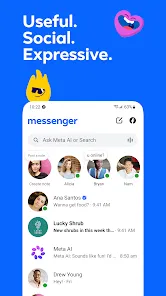
CHAT AND CALL ANYONE, ANYWHERE
Find and connect with your friends and family on Facebook and Messenger, no phone number needed.
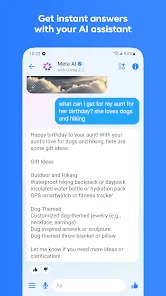
GET INSTANT ANSWERS FROM YOUR AI ASSISTANT*
Meta AI is your assistant that can answer any questions, give you advice, help with homework, and more.
SEND YOUR PHOTOS IN HIGH DEFINITION
Send and receive clearer, crisper picture of your favorite moments with Messenger.
CREATE SHARED ALBUMS
From a recent summer vacation to your grandma’s 80th birthday, create albums of photos and videos to share, organize and reminisce over important moments in your group chats.
EASILY ADD NEW CONNECTIONS WITH QR CODES
Connect with people you meet in real life by scanning their Messenger QR code or sharing yours via a link.
SHARE LARGE FILES DIRECTLY IN CHAT
Whether it’s a Word, PDF, or Excel doc, you can send large files up to 100MB right inside of Messenger.
EDIT AND UNSEND MESSAGES
Hit send too soon? You can edit the message up to 15 minutes after sending
DISAPPEARING MESSAGES
Some things aren’t meant to last forever. Choose how long your end-to-end encrypted chats stick around after they’ve been read.
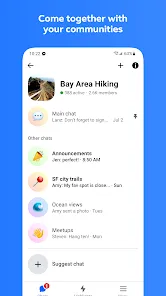
COME TOGETHER WITH YOUR COMMUNITIES
Meaningfully connect with people like you from your school, neighborhood, and interest groups.
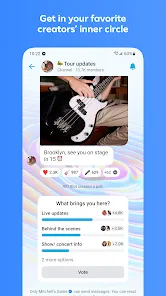
GET IN YOUR FAVORITE CREATORS’ INNER CIRCLE
Stay in the know with creators by joining their broadcast channels for authentic and casual content.
UNLEASH YOUR IMAGINATION W/ META AI*
Tap into your go-to creative partner to create, edit, animate images and more.
CAPTURE EVERYDAY MOMENTS ON STORIES
Highlight moments of your day using photos and videos that disappear after 24 hours in Stories.
DROP A NOTE WITH YOUR THOUGHTS
Stay connected with your friends by sharing quick updates that disappear after 24 hours.
BRING YOUR VIBE TO YOUR CHATS
Sometimes words just don’t cut it. Tap into more ways to express yourself with animated stickers, GIFs, reactions and more.
SET THE MOOD OF YOUR CHAT WITH THEMES
Customize your chat with a large and constantly evolving list of themes featuring popular artists, holidays, and more.
*Meta AI is available in select languages and countries only, with more coming soon.
Download from the official store


You May Like







Questions & Answers
Q1 Why don't you provide direct APK file downloads?
To ensure your device's security and data privacy, we strictly adhere to official distribution policies and only direct you to Google Play and the App Store. Official stores automatically match your device model, OS version, and region, delivering the most stable, untampered legitimate apps, while avoiding potential malware or malicious code that third-party files might carry.
Q2 What are the benefits of downloading from Google Play / the App Store?
✅ Automatic updates - When a new version is released, the store pushes it to you automatically - no need to manually hunt for installation packages.
✅ Security scanning - Both stores rigorously review uploaded apps for viruses, trojans, and excessive permission requests.
✅ Legal compliance - They comply with regional software distribution regulations, reducing issues with copyright or geographic restrictions.
✅ Easy and fast - One-click install, no need to enable Install from unknown sources manually.
Q3 What if my phone doesn't have Google Play or the App Store?
Android users: Most legitimate Android devices come with Google Play. If you cannot access it due to network issues, we recommend using your device's official built-in app market (e.g., Huawei AppGallery, Xiaomi GetApps, Samsung Galaxy Store) to download the app - these also have security review mechanisms.
Apple users: The App Store is the only official distribution channel for iOS. Please do not install enterprise-signed or jailbroken versions via third-party tools, as this may void your warranty and compromise your privacy.
Q4 Is there any difference between an app downloaded from an official store and an APK package?
The core content is identical, but the official store delivers an installation package optimized for your specific device (e.g., split ABIs, screen resolution), resulting in a smaller size and smoother performance. Generic APK packages may contain redundant files or even be injected with ad or tracking SDKs. We strongly recommend using the store version whenever possible.
Q5 After I jump to the store, if I see multiple apps with the same name, how do I choose the genuine one?
The link we provide points directly to the official developer's page, so clicking it will take you straight to the authentic app - you just need to tap Install without searching manually.
If you do search by yourself and encounter similar names, always check:
① Whether the developer name matches the official one (e.g., Google LLC or the app's owning company);
② Whether the icon is clear and the description professional;
③ Whether the download count, ratings, and reviews are reasonable (genuine apps typically have hundreds of thousands or more installs).
The safest approach: always use the Go to Official Download button on our page - never search for similar names in the store to avoid fake or ad-ridden copies. We only direct you to official links, saving you the hassle of identification.
