Wells Fargo Mobile®

Category Finance
Rating
4.7
Downloads
77945
Version
25.0.0
Safety
100% Safe
Advertisement

App screenshots

Advertisement

About Wells Fargo Mobile®

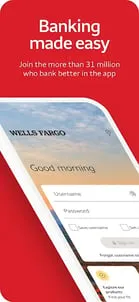
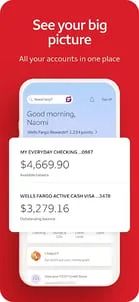
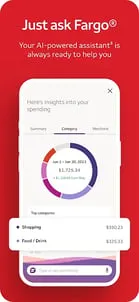
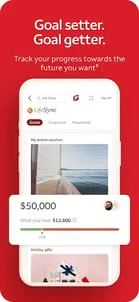
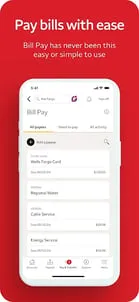
Account Management•Access your cash, credit, and investment accounts with Fingerprint Sign On¹ or Biometric Sign on¹•Review activity and balances•View your credit card transactions and manage your rewards•Easily activate or turn cards on or off², add cards to digital wallets³, view recurring payments, and manage account access with Card SettingsDeposit Funds⁴•Deposit checks using your Android™ camera •Instantly view the processing deposit in your accountMake Transfers and Payments•Transfer funds between your Wells Fargo accounts and to other financial institutions⁵•Send and receive money with friends and family using a U.S. mobile phone number or email address with Zelle®⁶•Pay your billsTrack Investments•Monitor balances, holdings, account activity, and open orders for your WellsTrade® accounts•Get real-time quotes, charts, and market dataStay Secure•Visit the Security Center to report fraud and maintain safe accounts•Manage alerts⁷•Get notified of suspicious card activity with alerts•Access to your FICO® Credit ScoreContact Us•Email appstorefeedback@wellsfargo.com•Locate one of more than 12,700 ATMs or find one of our approximately 4,800 branches•Set up an appointment to meet with a Banker____________________________Screens are simulated.1.Only certain devices are eligible to enable Fingerprint Sign On or Biometric Sign On.2.Turning your card off is not a replacement for reporting your card lost or stolen. 3.Not all smartphones are enabled to use a digital wallet. Your mobile carrier's message and data rates may apply.4.Some accounts are not eligible for mobile deposit. Deposit limits and other restrictions apply.5.Terms and conditions apply. See Wells Fargo’s Online Access Agreement for more information.6. Mobile numbers may need to be enrolled with Zelle before they can be used. Available to U.S.-based bank account holders only. 7.Sign-up may be required. 8.Some features not offered on all devices or to all users.Android, Google Play, Chrome, Pixel and other marks are trademarks of Google LLC.FICO is a registered trademark of Fair Isaac Corporation in the United States and other countries.Zelle and the Zelle related marks are wholly owned by Early Warning Services, LLC and are used herein under license.Investment and Insurance Products are:•Not Insured by the FDIC or Any Federal Government Agency•Not a Deposit or Other Obligation of, or Guaranteed by, the Bank or Any Bank Affiliate•Subject to Investment Risks, Including Possible Loss of the Principal Amount InvestedDEPOSIT PRODUCTS OFFERED BY WELLS FARGO BANK, N.A. MEMBER FDIC.Investment products and services are offered through Wells Fargo Advisors. Wells Fargo Advisors is a trade name used by Wells Fargo Clearing Services, LLC (WFCS) and Wells Fargo Advisors Financial Network, LLC, Members SIPC, separate registered broker-dealers and non-bank affiliates of Wells Fargo & Company. WellsTrade(R) and Intuitive Investor(R) accounts are available through WFCS.Use of stock symbols is for illustrative purposes only and not a recommendation.9.$0 per trade is applicable to commissions for online and automated telephone trading of stocks and exchange-traded funds (ETFs). For stock and ETF trades placed with an agent over the telephone, a $25 agent-assisted trading fee is charged. Each trade order will be treated as a separate transaction subject to commission. An order that executes over multiple trading days may be subject to additional commission. One commission will be assessed for multiple trades, entered separately, that execute on the same day, on the same side of the market. Other fees and commissions apply to a WellsTrade account. Schedule subject to change at any time.RSNIP-02212027-8313203.1.1
Advertisement

Download from the official store

You May Like

Questions & Answers

Q1 Why don't you provide direct APK file downloads?

To ensure your device's security and data privacy, we strictly adhere to official distribution policies and only direct you to Google Play and the App Store. Official stores automatically match your device model, OS version, and region, delivering the most stable, untampered legitimate apps, while avoiding potential malware or malicious code that third-party files might carry.

Q2 What are the benefits of downloading from Google Play / the App Store?

✅ Automatic updates - When a new version is released, the store pushes it to you automatically - no need to manually hunt for installation packages.

✅ Security scanning - Both stores rigorously review uploaded apps for viruses, trojans, and excessive permission requests.

✅ Legal compliance - They comply with regional software distribution regulations, reducing issues with copyright or geographic restrictions.

✅ Easy and fast - One-click install, no need to enable Install from unknown sources manually.

Q3 What if my phone doesn't have Google Play or the App Store?

Android users: Most legitimate Android devices come with Google Play. If you cannot access it due to network issues, we recommend using your device's official built-in app market (e.g., Huawei AppGallery, Xiaomi GetApps, Samsung Galaxy Store) to download the app - these also have security review mechanisms.

Apple users: The App Store is the only official distribution channel for iOS. Please do not install enterprise-signed or jailbroken versions via third-party tools, as this may void your warranty and compromise your privacy.

Q4 Is there any difference between an app downloaded from an official store and an APK package?

The core content is identical, but the official store delivers an installation package optimized for your specific device (e.g., split ABIs, screen resolution), resulting in a smaller size and smoother performance. Generic APK packages may contain redundant files or even be injected with ad or tracking SDKs. We strongly recommend using the store version whenever possible.

Q5 After I jump to the store, if I see multiple apps with the same name, how do I choose the genuine one?

The link we provide points directly to the official developer's page, so clicking it will take you straight to the authentic app - you just need to tap Install without searching manually.

If you do search by yourself and encounter similar names, always check:

① Whether the developer name matches the official one (e.g., Google LLC or the app's owning company);

② Whether the icon is clear and the description professional;

③ Whether the download count, ratings, and reviews are reasonable (genuine apps typically have hundreds of thousands or more installs).

The safest approach: always use the Go to Official Download button on our page - never search for similar names in the store to avoid fake or ad-ridden copies. We only direct you to official links, saving you the hassle of identification.

back to top