Rating
4.2
Downloads
79551
Version
4.2.0
Safety
100% Safe
Advertisement

App screenshots

Advertisement

About Cash App

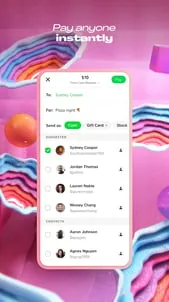
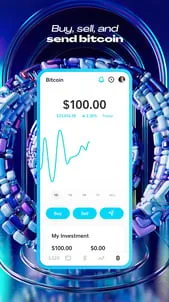
Cash App is the easy way to send, spend, save, and invest* your money. HERE’S HOW IT WORKS Download and sign up for Cash App in a matter of minutes. The signup process is simple and fast so that you can start using Cash App right away. SEND AND RECEIVE MONEY INSTANTLY AT NO COST Receive, request, and send money from friends and family instantly with only a few taps. Cash App is the easy way to pay a friend back for dinner or split rent with your roommates. GET A FREE CUSTOM VISA DEBIT CARD Order your Cash App Card (a customizable Visa debit card) directly from Cash App. You’ll be able to instantly make purchases using your virtual card. We’ll also mail you your physical laser-etched Cash App Card so you can swipe, dip, or tap at any merchant. Debit card issued by Cash App’s bank partner(s). ATM withdrawal fees may apply. RECEIVE YOUR PAYCHECK UP TO TWO DAYS EARLY Deposit paychecks, tax returns, unemployment benefits, government stimulus payouts and more directly into your Cash App balance using your account and routing number. Receive deposits up to two days earlier than is standard with most banks. Use the same account and routing information to pay bills using your balance. Cash App is a financial services platform, not a bank. Banking services provided by Cash App’s bank partner(s). GET INSTANT DISCOUNTS WITH CASH OFFERS Cash App Card is the only free debit card** with instant discounts at your favorite stores, websites, apps, and restaurants. These instant discounts are easy to use and are applied to Cash App Card transactions instantly. Just select a given Cash offer in your app and then use your Cash App Card to pay. It’s that simple. No points, no waiting, just instant savings. BUY, SELL, SEND, AND RECEIVE BITCOIN Cash App is the easy way to buy, sell, send, gift, and receive bitcoin (BTC) — get started instantly with as little as $1. You can also set up recurring buys of bitcoin, withdraw it to a different cryptocurrency wallet — or send it to friends and family with compatible wallets (even those who don't have Cash App) and use the Lightning Network to pay with bitcoin faster, and for free on Cash App. Add Bitcoin offers to your Cash App Card to earn bitcoin on your purchases. Bitcoin services are provided by Block, Inc. (formerly known as Square, Inc.), not Cash App Investing LLC. Purchasing bitcoin involves risk; you may lose money. BUY & SELL STOCKS COMMISSION-FREE Instantly begin investing commission-free. You can buy as little as $1 of stock in top US companies.*** Track stock prices in your app and monitor the performance of your overall investment portfolio. Create a list of companies to follow so you can stay up to date on performance. Regulatory and external transfer fees may apply, see the House Rules. CASH APP FOR EVERYONE 13 AND UP Everyone 13 and up can send money to friends, get a Cash Card, invest, or start a savings goal with approval from a parent or trusted adult for a sponsored account. *Brokerage Services are provided by Cash App Investing LLC, member FINRA/SIPC, subsidiary of Block, Inc. Investing involves risk; you may lose money. Investments are not FDIC insured. This is not a recommendation for you to transact in securities. Company names and logos are shown for illustrative purposes only and are not endorsements. **Cash App is a financial services platform, not a bank. Banking services and Cash App Card are provided and issued by Cash App’s bank partners, not Cash App Investing LLC. ***Fractional shares are not transferable. For additional conditions and limitations, see the Cash App Investing Customer Agreement. Reach Cash App Support by calling 1 (800) 969-1940 or reach us by mail at: Block, Inc. 1955 Broadway, Suite 600 Oakland, CA 94612
Advertisement

Download from the official store

You May Like

Questions & Answers

Q1 Why don't you provide direct APK file downloads?

To ensure your device's security and data privacy, we strictly adhere to official distribution policies and only direct you to Google Play and the App Store. Official stores automatically match your device model, OS version, and region, delivering the most stable, untampered legitimate apps, while avoiding potential malware or malicious code that third-party files might carry.

Q2 What are the benefits of downloading from Google Play / the App Store?

✅ Automatic updates - When a new version is released, the store pushes it to you automatically - no need to manually hunt for installation packages.

✅ Security scanning - Both stores rigorously review uploaded apps for viruses, trojans, and excessive permission requests.

✅ Legal compliance - They comply with regional software distribution regulations, reducing issues with copyright or geographic restrictions.

✅ Easy and fast - One-click install, no need to enable Install from unknown sources manually.

Q3 What if my phone doesn't have Google Play or the App Store?

Android users: Most legitimate Android devices come with Google Play. If you cannot access it due to network issues, we recommend using your device's official built-in app market (e.g., Huawei AppGallery, Xiaomi GetApps, Samsung Galaxy Store) to download the app - these also have security review mechanisms.

Apple users: The App Store is the only official distribution channel for iOS. Please do not install enterprise-signed or jailbroken versions via third-party tools, as this may void your warranty and compromise your privacy.

Q4 Is there any difference between an app downloaded from an official store and an APK package?

The core content is identical, but the official store delivers an installation package optimized for your specific device (e.g., split ABIs, screen resolution), resulting in a smaller size and smoother performance. Generic APK packages may contain redundant files or even be injected with ad or tracking SDKs. We strongly recommend using the store version whenever possible.

Q5 After I jump to the store, if I see multiple apps with the same name, how do I choose the genuine one?

The link we provide points directly to the official developer's page, so clicking it will take you straight to the authentic app - you just need to tap Install without searching manually.

If you do search by yourself and encounter similar names, always check:

① Whether the developer name matches the official one (e.g., Google LLC or the app's owning company);

② Whether the icon is clear and the description professional;

③ Whether the download count, ratings, and reviews are reasonable (genuine apps typically have hundreds of thousands or more installs).

The safest approach: always use the Go to Official Download button on our page - never search for similar names in the store to avoid fake or ad-ridden copies. We only direct you to official links, saving you the hassle of identification.

back to top