Sole Retriever - Sneakers

Category Shopping
Rating
4.1
Downloads
55279
Version
4.4.0
Safety
100% Safe
Advertisement

App screenshots

Advertisement

About Sole Retriever - Sneakers

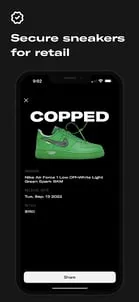
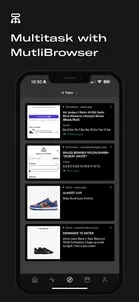
THE ULTIMATE APP FOR EVERY SNEAKERHEADYou’re not dreaming; this is reality. Sole Retriever’s exclusive mobile app has finally arrived!Sole Retriever is every sneakerhead’s one-stop-shop for all things sneaker raffles, releases, news and more. We help sneaker fanatics just like you secure all of the latest hyped upcoming drops for retail.--Download the app and create an account! Users have the option to start a 7 day free trial for either of our plans - Basic or Pro - either on a monthly or yearly recurring basis.The Basic Plan (monthly) is an auto-renewing subscription of $6.99 billed monthly. The Basic Plan (yearly) is an auto-renewing subscription of $69.99 billed yearly. Users on the Basic Plan will enjoy functionality of the entire application while their subscription is active, with the exception of Restock feed/alerts. Please note that other features may be released exclusively to Pro users.The Pro Plan (monthly) is an auto-renewing subscription of $14.99 billed monthly. The Pro Plan (yearly) is an auto-renewing subscription of $149.99 billed yearly. Users on the Pro Plan will enjoy full functionality of the entire application while their subscription is active, including Restock feed/alerts.To manage or cancel your trial or subscription, please refer to your Android Account Settings.--SNEAKER RAFFLES & RELEASE INFOWe dig up sneaker raffles and releases from around the globe, giving you the best chances to cop the most popular hyped sneaker releases for retail. Navigate the latest raffles and releases for every upcoming drop. We’ve created the most simple, organized, and user-friendly app for every sneakerhead.REAL-TIME, PERSONALIZED NOTIFICATIONSGet notified the second a new raffle is posted. Subscribe to individual sneakers and customize your desired alerts. Be the first to hear about the latest deals and steals and stay up-to-date with all of our official announcements.RESTOCK ALERTS [Pro-exclusive feature]Enjoy real-time restock alerts from the top sneaker and streetwear sites.MULTIBROWSEREffortlessly open and navigate between multiple notifications and restocks, keeping track of all of them simultaneously. View everything side by side without having to switch between different screens or needing to quit one to access another.STAY IN THE KNOW & DISCOVER THE LATEST DROPSTake advantage of our up-to-the-minute, detailed, and easy-to-use in-app calendar. Keep track of all of the hottest upcoming sneaker launches and never miss a drop again.ADVANCED RAFFLE AUTOFILL WITH CUSTOM PROFILESQuickly enter raffles using our advanced autofill feature. Save your profiles, select a raffle, and let autofill take care of the hard work. Entering raffles has never been easier or faster. (Autofill applicable on raffles which qualify, always being improved and updated)SAVE YOUR RETAILER ACCOUNT LOGINSOur custom, in-app browser saves your session when entering raffles. No need to login on every retailer’s site over and over again. Do it once and you’re good to go.CUSTOM FILTERING CAPABILITIESFilter raffles down to the exact region, type, and retrieval method your heart desires! No more wasting time. View raffles you qualify for by setting your personalized filters. Hide raffles you’ve already entered, or ones that are closed, too!RAFFLE ENTRY TRACKINGNo more forgetting if you entered raffles. As soon as you complete a raffle, mark it as entered with one simple tap of the finger. Come back later and continue right where you left off.SEARCH THE ARCHIVEFeeling nostalgic? Time travel and search any previous sneaker release that we’ve covered with just a few taps. It’s that easy.WHAT ARE YOU WAITING FOR?If you've made it this far, you know good and well that Sole Retriever's mobile app is an absolute game-changer. Give it a go.--Please be sure to read our Terms of Use and Privacy Policy:https://www.soleretriever.com/terms-of-servicehttps://www.soleretriever.com/privacy-policy
Advertisement

Download from the official store

You May Like
Questions & Answers

Q1 Why don't you provide direct APK file downloads?

To ensure your device's security and data privacy, we strictly adhere to official distribution policies and only direct you to Google Play and the App Store. Official stores automatically match your device model, OS version, and region, delivering the most stable, untampered legitimate apps, while avoiding potential malware or malicious code that third-party files might carry.

Q2 What are the benefits of downloading from Google Play / the App Store?

✅ Automatic updates - When a new version is released, the store pushes it to you automatically - no need to manually hunt for installation packages.

✅ Security scanning - Both stores rigorously review uploaded apps for viruses, trojans, and excessive permission requests.

✅ Legal compliance - They comply with regional software distribution regulations, reducing issues with copyright or geographic restrictions.

✅ Easy and fast - One-click install, no need to enable Install from unknown sources manually.

Q3 What if my phone doesn't have Google Play or the App Store?

Android users: Most legitimate Android devices come with Google Play. If you cannot access it due to network issues, we recommend using your device's official built-in app market (e.g., Huawei AppGallery, Xiaomi GetApps, Samsung Galaxy Store) to download the app - these also have security review mechanisms.

Apple users: The App Store is the only official distribution channel for iOS. Please do not install enterprise-signed or jailbroken versions via third-party tools, as this may void your warranty and compromise your privacy.

Q4 Is there any difference between an app downloaded from an official store and an APK package?

The core content is identical, but the official store delivers an installation package optimized for your specific device (e.g., split ABIs, screen resolution), resulting in a smaller size and smoother performance. Generic APK packages may contain redundant files or even be injected with ad or tracking SDKs. We strongly recommend using the store version whenever possible.

Q5 After I jump to the store, if I see multiple apps with the same name, how do I choose the genuine one?

The link we provide points directly to the official developer's page, so clicking it will take you straight to the authentic app - you just need to tap Install without searching manually.

If you do search by yourself and encounter similar names, always check:

① Whether the developer name matches the official one (e.g., Google LLC or the app's owning company);

② Whether the icon is clear and the description professional;

③ Whether the download count, ratings, and reviews are reasonable (genuine apps typically have hundreds of thousands or more installs).

The safest approach: always use the Go to Official Download button on our page - never search for similar names in the store to avoid fake or ad-ridden copies. We only direct you to official links, saving you the hassle of identification.

back to top