Zip - Buy Now, Pay Later

Category Shopping
Rating
4.4
Downloads
33189
Version
1.2.3
Safety
100% Safe
Advertisement

App screenshots

Advertisement

About Zip - Buy Now, Pay Later

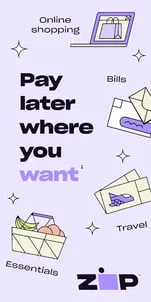
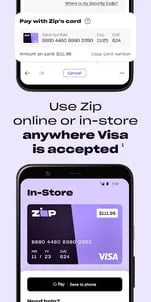
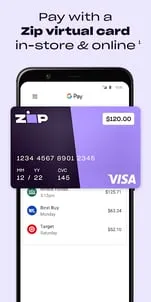
Zip (previously Quadpay) gives savvy shoppers more freedom and flexibility to buy now, pay later where they want with the Zip app.Split payments into 4 easy installments, pay over 6 weeks¹, and enjoy shopping at millions of online and in-store retailers2.If you’re a super deal finder, this is the smarter way to find great deals, shop now, pay later, and stretch your funds.SPLIT ANY PURCHASE IN 4¹Buy now, pay later: shop your favorite brands and pay with your linked account in 4 payments over 6 weeks¹. Get an instant decision³, with no long application forms or hassle.USE ZIP WHERE YOU WANT, ONLINE OR IN-STORE²Install our app and use Zip (previously Quadpay) pretty much anywhere to shop now and pay later — whether online or in-store². To make payments seamless, add Zip to your Apple Wallet or Google Pay for easy access, with amazing shopping at millions of stores².Our buy now, pay later platform helps you pay for your shopping in 4 payments¹. When you use Zip (previously Quadpay), there is no impact on your credit score. We’ll let you know when installments are due, so you’re on top of your split payments & purchases.If you’re a great deal finder, you’ll love Zip, which allows you to shop now and pay later in 4 payments¹.HOW DO I USE ZIP?Install the app and link your payment card to start shopping in millions of online and in-store retailers2.Check out our deal finder, browse our directory of merchants, or make purchases directly with the Zip (previously Quadpay) app at places that accept Visa4.Enter the amount you’d like to spend (including any taxes or shipping costs!). Your purchase will be split into 4 payments over 6 weeks¹, taking the worry and hassle out of shopping by allowing you to shop now, pay later. Easily track your spending, view transaction history, and manage split payments in the app.Update or change your account details, including payment method, at any time.Get answers to frequently asked questions and contact our support team directly from the app.CONNECT WITH USFor daily style tips, lifestyle hacks, and up-and-coming brands you’ll love, follow us on Instagram.https://www.instagram.com/zip_usa/¹For example, for a $335 purchase, you’d make four $85.25 payments every two weeks starting today for a 31.11% annual percentage rate and a total of payments of $341. A $6 installment fee is charged at commencement - you pay $1.50 of this fee as a prepaid finance charge when you make your initial payment today. The remaining $4.50 is included in your future payments. Actual installment fees vary and can range from $0 to $7.50 depending on the purchase price and Zip product used. Actual amount of fee for your purchase will be reflected in checkout. Estimation of installment payment and annual percentage rate excludes potential tax and shipping costs. Zip Pay Anywhere and Zip Checkout financing through Zip issued by WebBank. All loans are subject to credit approval.²Zip can only be used for US purchases. Certain merchant, product, goods, and service restrictions apply.³Eligibility criteria apply. See payment terms: https://zip.co/us/quadpay-terms-of-service. Loans to California residents, other than loans through the Zip App and Zip Card, are made or arranged pursuant to California Lenders Law license.⁴VISA is a trademark owned by Visa International Service Association and used under license
Advertisement

Download from the official store

You May Like
Questions & Answers

Q1 Why don't you provide direct APK file downloads?

To ensure your device's security and data privacy, we strictly adhere to official distribution policies and only direct you to Google Play and the App Store. Official stores automatically match your device model, OS version, and region, delivering the most stable, untampered legitimate apps, while avoiding potential malware or malicious code that third-party files might carry.

Q2 What are the benefits of downloading from Google Play / the App Store?

✅ Automatic updates - When a new version is released, the store pushes it to you automatically - no need to manually hunt for installation packages.

✅ Security scanning - Both stores rigorously review uploaded apps for viruses, trojans, and excessive permission requests.

✅ Legal compliance - They comply with regional software distribution regulations, reducing issues with copyright or geographic restrictions.

✅ Easy and fast - One-click install, no need to enable Install from unknown sources manually.

Q3 What if my phone doesn't have Google Play or the App Store?

Android users: Most legitimate Android devices come with Google Play. If you cannot access it due to network issues, we recommend using your device's official built-in app market (e.g., Huawei AppGallery, Xiaomi GetApps, Samsung Galaxy Store) to download the app - these also have security review mechanisms.

Apple users: The App Store is the only official distribution channel for iOS. Please do not install enterprise-signed or jailbroken versions via third-party tools, as this may void your warranty and compromise your privacy.

Q4 Is there any difference between an app downloaded from an official store and an APK package?

The core content is identical, but the official store delivers an installation package optimized for your specific device (e.g., split ABIs, screen resolution), resulting in a smaller size and smoother performance. Generic APK packages may contain redundant files or even be injected with ad or tracking SDKs. We strongly recommend using the store version whenever possible.

Q5 After I jump to the store, if I see multiple apps with the same name, how do I choose the genuine one?

The link we provide points directly to the official developer's page, so clicking it will take you straight to the authentic app - you just need to tap Install without searching manually.

If you do search by yourself and encounter similar names, always check:

① Whether the developer name matches the official one (e.g., Google LLC or the app's owning company);

② Whether the icon is clear and the description professional;

③ Whether the download count, ratings, and reviews are reasonable (genuine apps typically have hundreds of thousands or more installs).

The safest approach: always use the Go to Official Download button on our page - never search for similar names in the store to avoid fake or ad-ridden copies. We only direct you to official links, saving you the hassle of identification.

back to top