ExpressVPN: Fast & Secure VPN

Category Tools
Rating
3.7
Downloads
25476
Version
12.3.0
Safety
100% Safe
Advertisement

App screenshots

Advertisement

About ExpressVPN: Fast & Secure VPN

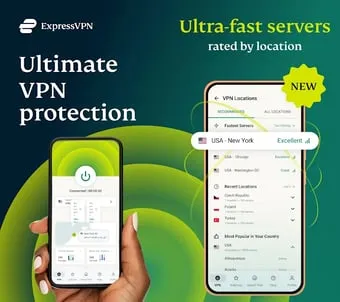
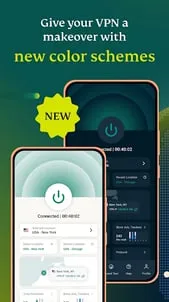
Get fast servers in 105 locations with a 7-day free trial !, ExpressVPN include many U.S. states, for streaming live sports like the Super Bowl, World Series, and more Download ExpressVPN – Fast & Private VPN App The top-rated VPN for secure browsing and streaming, ExpressVPN’s advanced encryption keeps your data safe on any network, whether public Wi-Fi or at home. Experience blazing-fast, military-grade VPN protection. ExpressVPN is your secure and reliable free VPN solution for private internet access, streaming, and browsing.✅ The VPN trusted by TechRadar, CNET, Tom's Guide, PCWorld, and more! ⭐ """"ExpressVPN sets the standard for speed, security, and privacy. A must-have for anyone serious about online protection."""" – TechRadar⭐ """"The fastest and most reliable VPN for streaming content without borders."""" – PCWorld🛡 Why Americans Love ExpressVPN?⚡ Fast VPN SpeedsConnect to one of our many fast VPN servers in 105 countries. With ExpressVPN’s easy IP changer, fake out cyber snoops and criminals.🌎 Access your favorite content with an unlimited VPNGet unlimited bandwidth and secure access to a world of your favorite digital content, including movies, TV shows, music, podcasts, and more. 🏉 Stream Sports AnywhereCatch every rugby tackle or basketball slam dunk without buffering, wherever you are.🔒 Privacy You Can TrustBrowse with peace of mind knowing your data and IP address are protected under our strict no-logs policy, independently audited to guarantee your privacy. Encrypt your connection and browse safely on public Wi-Fi or at home.Other Advanced VPN Features You’ll Love: ✔ Kill SwitchStops all internet traffic if your VPN connection drops, keeping your data secure. (Available on Android 8 and higher.)✔ Split TunnellingChoose which apps use the VPN while others stay connected locally for the best of both worlds.✔ Unlimited Bandwidth & Global ServersAccess your favourite streaming content with no cap on speed or data.✔ Convenient WidgetEasily connect or disconnect, change server locations, or check your VPN status right from your home screen.✔ Auto-Connect on Untrusted NetworksAutomatically connects when you join public Wi-Fi or unsecure networks to keep your data safe.✔ Next-Generation EncryptionSupports Lightway UDP, Lightway TCP, OpenVPN UDP, and OpenVPN TCP for enhanced security and reliability.✔ Next-Generation VPN ProtocolExperience Lightway, ExpressVPN’s exclusive protocol for faster, more reliable connections.✔ Available on All DevicesProtect 8 devices with one subscription—Protect Android, iOS, Mac, Windows, Linux, smart TVs, and more.✔ 24/7 Customer SupportGet help anytime with our expert support team via live chat or email.✔ Built-In Password ManagerSecurely store unlimited passwords, notes, and credit card details with ExpressVPN Keys.Download ExpressVPN Today – USA’s Trusted VPN for Security & SpeedSecure your connection, unlock unlimited content, and enjoy a faster, safer internet experience.Subscription PlansOne subscription includes:✌️ Access to ExpressVPN apps on all platforms.✌️ Protection for up to 8 devices simultaneously.✌️ Subscriptions automatically renew unless cancelled at least 24 hours before the end of the billing period. Manage your plan easily in your Google Play account settings.Terms of Servicehttps://www.expressvpn.com/tos Privacy Policyhttps://www.expressvpn.com/privacy-policy
Advertisement

Download from the official store

You May Like

Questions & Answers

Q1 Why don't you provide direct APK file downloads?

To ensure your device's security and data privacy, we strictly adhere to official distribution policies and only direct you to Google Play and the App Store. Official stores automatically match your device model, OS version, and region, delivering the most stable, untampered legitimate apps, while avoiding potential malware or malicious code that third-party files might carry.

Q2 What are the benefits of downloading from Google Play / the App Store?

✅ Automatic updates - When a new version is released, the store pushes it to you automatically - no need to manually hunt for installation packages.

✅ Security scanning - Both stores rigorously review uploaded apps for viruses, trojans, and excessive permission requests.

✅ Legal compliance - They comply with regional software distribution regulations, reducing issues with copyright or geographic restrictions.

✅ Easy and fast - One-click install, no need to enable Install from unknown sources manually.

Q3 What if my phone doesn't have Google Play or the App Store?

Android users: Most legitimate Android devices come with Google Play. If you cannot access it due to network issues, we recommend using your device's official built-in app market (e.g., Huawei AppGallery, Xiaomi GetApps, Samsung Galaxy Store) to download the app - these also have security review mechanisms.

Apple users: The App Store is the only official distribution channel for iOS. Please do not install enterprise-signed or jailbroken versions via third-party tools, as this may void your warranty and compromise your privacy.

Q4 Is there any difference between an app downloaded from an official store and an APK package?

The core content is identical, but the official store delivers an installation package optimized for your specific device (e.g., split ABIs, screen resolution), resulting in a smaller size and smoother performance. Generic APK packages may contain redundant files or even be injected with ad or tracking SDKs. We strongly recommend using the store version whenever possible.

Q5 After I jump to the store, if I see multiple apps with the same name, how do I choose the genuine one?

The link we provide points directly to the official developer's page, so clicking it will take you straight to the authentic app - you just need to tap Install without searching manually.

If you do search by yourself and encounter similar names, always check:

① Whether the developer name matches the official one (e.g., Google LLC or the app's owning company);

② Whether the icon is clear and the description professional;

③ Whether the download count, ratings, and reviews are reasonable (genuine apps typically have hundreds of thousands or more installs).

The safest approach: always use the Go to Official Download button on our page - never search for similar names in the store to avoid fake or ad-ridden copies. We only direct you to official links, saving you the hassle of identification.

back to top