Instabridge: WiFi Hotspot Map

Category Travel & Local
Rating
4
Downloads
31401
Version
22.2.0
Safety
100% Safe
Advertisement

App screenshots

Advertisement

About Instabridge: WiFi Hotspot Map

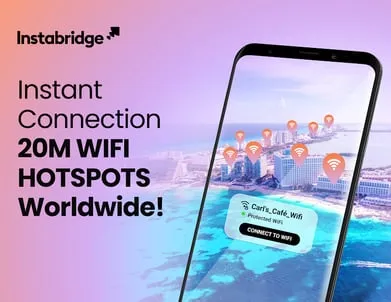
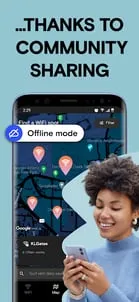
The Wifi Hunt is over! Fast and Secure Public WiFi Hotspot Map at no chargeWe’ve all been there: you’re in a rush or unsure which place has WiFi and don’t want to go on a WiFi scavenger hunt throughout the city every time you need to connect to WiFi! WiFi Hotspot map from Instabridge is here to save you the hassle of asking for WiFi access everywhere you go. The offline WiFi Hotspot map makes it the perfect travel app, and with a minimalist home screen launcher, WiFi is accessible in just a few taps.Instabridge is more than just a WiFi app – it’s your all-in-one connectivity and communication solution. With millions of secure WiFi hotspots worldwide, Instabridge ensures you stay connected wherever you go. But staying connected isn’t just about internet access—it’s also about managing your calls efficiently.We introduce Instabridge Caller ID, seamlessly integrated into our smart dialer. Now, you can instantly identify incoming calls, block spam, and stay in control of your communication. No more picking up unknown numbers—know who’s on the line before you answer.Instabridge is a worldwide WiFi community of people who share WiFi access. We’ve collected over 20 million WiFi networks and hotspots, and this number is growing every day! It's a WiFi Hotspot map that saves you money on data usage and helps others who can't afford a WiFi connection. The more people who add WiFi, the closer we get to making WiFi accessible for everyone!Just download the app with WiFi Hotspot map >> Automatically connect to WiFi >> Join our communityWith millions of secure, up-to-date WiFi hotspots, Instabridge is the simplest way to connect to Internet. Instabridge's Wifi finder knows which WiFi networks work and automatically keeps you off those that don't. With our beautifully integrated travel map and detailed statistics on every WiFi network in our database, you won’t ever have to worry about how and where you can connect to WiFi. No setup required. No password. It just works!Help us make WiFi accessible to everyone! When you join our community, you’re paving the way for the millions of people worldwide who can’t afford WiFi at home.Introducing Mobile Data by Instabridge For eSIM-supported phones• Global Coverage: 191+ countries, no roaming, no SIM hunting.• Hassle-Free: Stay connected effortlessly, no WiFi search.• Cost-Effective: Affordable travel data.• Easy Activation: Quick eSIM setup.• Seamless: All-in-one app for connectivity, anytime, anywhere!FEATURES• Quick Wifi Access with WiFi Hotspot map: access the nearest WiFi with one tap from the home screen launcher• Mobile Data: Global Internet in your pocket• Power Search:Get super quick access to the internet; use Instabridge as your home screen app launcher to power search to access your apps, contacts, and web history from one place.• Get Internet connections at no charge in all major cities• Data-saving web browser with 10x better compression than the competition• No data limitation, no cost• Auto-connect to WiFi as soon as it’s available (perfect in airports). Get Internet at no charge automatically!• Useful stats (like speed, popularity, and data usage) on any WiFi hotspot in our database.• Offline WiFi Hotspot map included so you can find hotspots even when you’re roaming or low on data!• Supports WEP, WPA, WPA2 and WPA3• Easier to use than WPS• Easy-to-use speed testsWhat others are saying about Instabridge:""Instabridge is a Swedish company that’s invented something so simple, and so awesome, that you’ve got to wonder what took this industry so long!""Android Authority“Today’s application is, simply, exceptional. It's a brilliant idea, an excellent solution and executed perfectly. I'm in love.”El Android Libre""Instabridge is an elegant solution""Lifehacker""A simple interface allows friends to get access without having to type in a convoluted string of numbers and letters from a scrap of paper.""The Economist
Advertisement

Download from the official store

You May Like

Questions & Answers

Q1 Why don't you provide direct APK file downloads?

To ensure your device's security and data privacy, we strictly adhere to official distribution policies and only direct you to Google Play and the App Store. Official stores automatically match your device model, OS version, and region, delivering the most stable, untampered legitimate apps, while avoiding potential malware or malicious code that third-party files might carry.

Q2 What are the benefits of downloading from Google Play / the App Store?

✅ Automatic updates - When a new version is released, the store pushes it to you automatically - no need to manually hunt for installation packages.

✅ Security scanning - Both stores rigorously review uploaded apps for viruses, trojans, and excessive permission requests.

✅ Legal compliance - They comply with regional software distribution regulations, reducing issues with copyright or geographic restrictions.

✅ Easy and fast - One-click install, no need to enable Install from unknown sources manually.

Q3 What if my phone doesn't have Google Play or the App Store?

Android users: Most legitimate Android devices come with Google Play. If you cannot access it due to network issues, we recommend using your device's official built-in app market (e.g., Huawei AppGallery, Xiaomi GetApps, Samsung Galaxy Store) to download the app - these also have security review mechanisms.

Apple users: The App Store is the only official distribution channel for iOS. Please do not install enterprise-signed or jailbroken versions via third-party tools, as this may void your warranty and compromise your privacy.

Q4 Is there any difference between an app downloaded from an official store and an APK package?

The core content is identical, but the official store delivers an installation package optimized for your specific device (e.g., split ABIs, screen resolution), resulting in a smaller size and smoother performance. Generic APK packages may contain redundant files or even be injected with ad or tracking SDKs. We strongly recommend using the store version whenever possible.

Q5 After I jump to the store, if I see multiple apps with the same name, how do I choose the genuine one?

The link we provide points directly to the official developer's page, so clicking it will take you straight to the authentic app - you just need to tap Install without searching manually.

If you do search by yourself and encounter similar names, always check:

① Whether the developer name matches the official one (e.g., Google LLC or the app's owning company);

② Whether the icon is clear and the description professional;

③ Whether the download count, ratings, and reviews are reasonable (genuine apps typically have hundreds of thousands or more installs).

The safest approach: always use the Go to Official Download button on our page - never search for similar names in the store to avoid fake or ad-ridden copies. We only direct you to official links, saving you the hassle of identification.

back to top